
Snapping
The pointer jumps to key points
When the pointer passes near a key point — within 10 screen pixels, at any zoom — it jumps onto it. All tools inherit this: they draw where the pointer says it is.
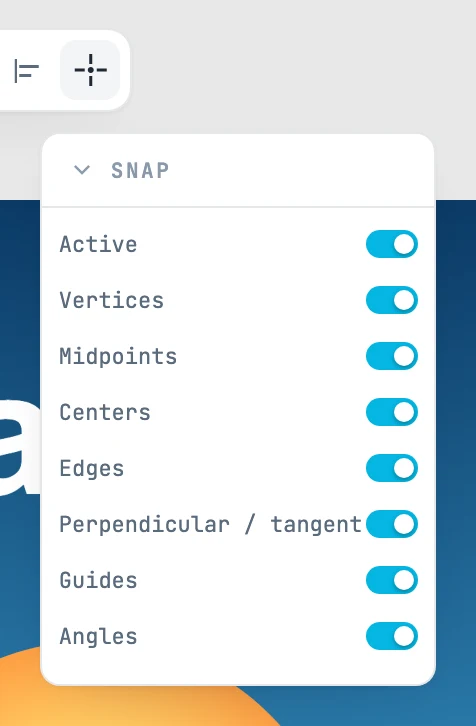
The Snap panel
It opens when you hover over the button with the snapping icon, in the toolbar. The button does not light up and clicking it does nothing: whether snapping is on or off is shown by the first row of the panel.
| Field | What it does |
|---|---|
| Active | turns snapping on and off. On by default |
| Vertices | vertices: the points the drawing actually has (endpoints, corners, path points) |
| Midpoints | the midpoint of segments |
| Centers | centers: of circles, ellipses, arcs, boxes |
| Edges | any point on the outline of a segment, the one closest to the pointer |
| Perpendicular / tangent | from the point you started from, the foot of the perpendicular on a straight line, or the point where a straight line touches a circle or an ellipse |
| Guides | the guides created by pausing on a snap point |
| Angles | the axes and 45° diagonals that start from the first point of a drawing |
Snapping and its types belong to the editor: they do not enter the history and are not saved. All types are on by default.
Which one wins
- A vertex always wins over a point on an outline: it is a point that really exists in the drawing.
- A point constructed on guides — the intersection of two guides — wins over a point on an outline.
- Perpendicular and tangent are looked for only when starting from a snap on a segment, and only if the point falls nearby: they do not make the pointer jump halfway across the screen.
Guides
If you pause for 400 milliseconds on a snap point, that snap point becomes a reference:
- a straight segment gives its infinite line;
- an arc gives its circle and its center — which is not on the curve, and is the point you look for most often;
- a vertex gives itself, with its two axes: passing it vertically or horizontally, you align with it.
Two guides taken together give their intersection. Guides accumulate while you hold still, up to eight (the oldest go first); they are cleared when you place a shape, with a click on empty space, and with Esc when there is nothing else to cancel.
Angles from the first point
When you start a drawing, the two axes and the two 45° diagonals start from the first point: the straight side of a rectangle, the square on the diagonal, a horizontal or vertical line come by themselves.
When it does not snap
- When moving with ⇧ (movement along a single axis).
- From the second point of a drawing made with ⇧.
- With the Pencil and the Brush: you draw the tremor of your hand, and snapping would break the stroke at every vertex it met.
- Over a page label, and when moving a page.