
Spine
Shapes bent along a line
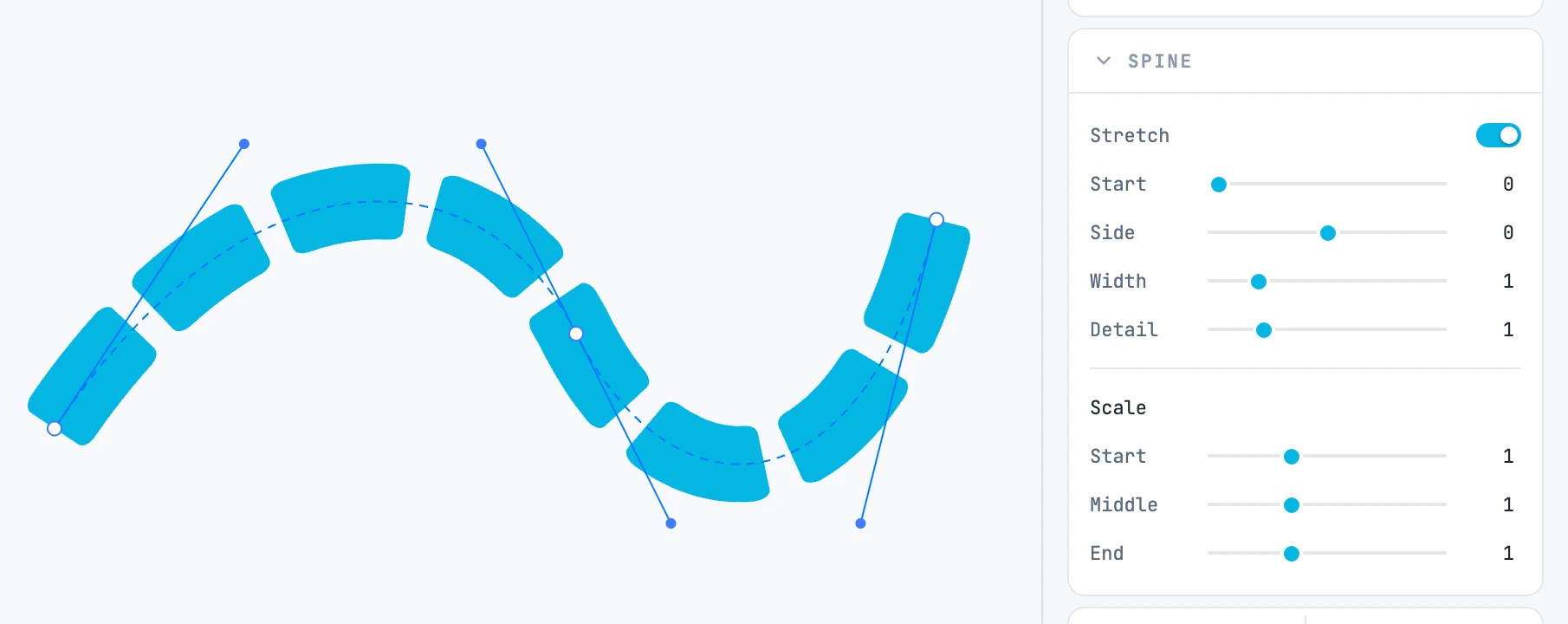
Creating it
Right-click menu › Modifiers › Spine, with at least two shapes selected. The last one in the stacking order (the topmost) is the line; the others bend along it. The line itself is not drawn, and the spine takes the appearance of the lowest shape.
The line
With the spine selected you see the dashed line, and its points are the handles: you drag them from outside, and the shapes bend again. Adding a point in the middle of a segment and removing it with ⌥ also work from here.
The parameters
In the Spine panel:
| Field | What it does |
|---|---|
| Stretch | on (the default), the shapes cover the whole line; off, they keep their size |
| Start | where they begin, as a fraction of the line (0.25 = a quarter of the way); it matters with Stretch off |
| Side | how far the shapes sit to the side of the line; at zero their center line lies on it |
| Width | how wide they are across, as a factor |
| Detail | how dense the pieces are into which the shapes are split to follow the curve; raise it only if a very tight bend looks jagged |
| Scale · Start / Middle / End | the scale across the line at its start, middle and end |
The brush stroke
A Brush stroke is a spine whose pieces have a role — head, middle, tail. The panel (header "Brush") has its own rows:
| Field | What it does |
|---|---|
| Thickness | the thickness of the stroke |
| Head | how much of the shape is the head, which is not repeated |
| Tail | how much is the tail |
| Repeat | on, the middle piece fills the rest of the stroke with copies: the brush lengthens without stretching |
| Join | on, the pieces that touch become a single outline |
| Side | to the side of the line |
| Detail | the fineness of the pieces |
| Scale · Start / Middle / End | the scale along the line |