
Exporting SVG
The Export SVG dialog, option by option
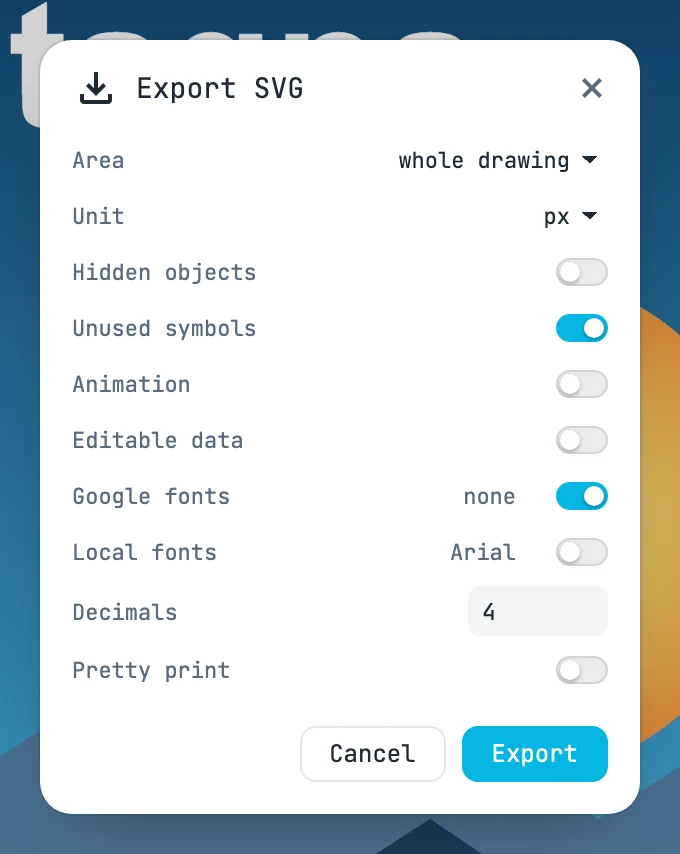
The dialog
| Field | What it does |
|---|---|
| Area | whole drawing (everything), active page (the active page), selection (only what is selected) |
| Unit | the unit of the file's width and height, measured on paper: px, mm, cm, inch, pt; by default the project's |
| Hidden objects | hidden objects go into the file, still hidden |
| Unused symbols | symbols that nothing uses as well: useful in an icon sprite. On by default |
| Editable data | the whole Janvas document inside the SVG: it reopens in Janvas as a document |
| Google fonts | the fonts from the Janvas library that the texts use, inside the SVG (free licenses). On by default, if needed |
| Local fonts | the installed fonts the texts use, inside the SVG; check their license. Document fonts are always included |
| Decimals | the decimal digits of coordinates and measurements, from 0 to 8; default 4. Matrices keep two more |
| Pretty print | one element per line, indented: readable, slightly larger |
What it writes
- Native shapes (rectangles, circles, ellipses, lines) where possible, paths for the rest.
- A boolean operation as its result path only; modifiers, arrays and dimensions as groups of shapes.
- Gradients, patterns, markers, filters, masks, clips and symbols as real SVG resources; symbols with their id.
- Texts as texts, one
tspanper run;currentColorstays as the keyword. - Timeline, tweens, guides, labels and interface are not exported.
- With the timeline playhead on a given time, the SVG writes the objects as they are at that time.
The file
The file name is asked for before writing. The dialog opens from the File menu.