
Context menu
The right-click menu
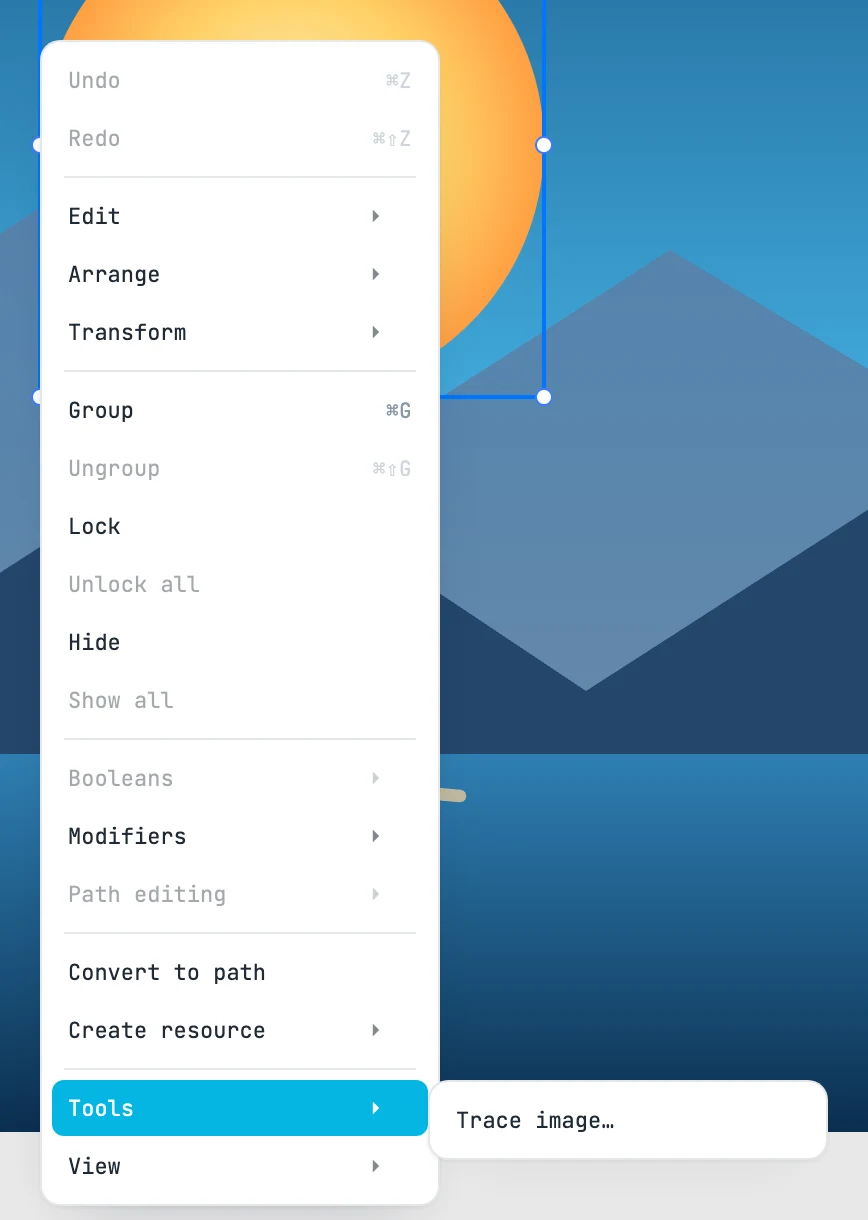
Opening and closing it
Right-click on the canvas without moving the mouse. Submenus open when you hover over them. It closes when you click outside it or choose an item.
The top level
| Item | Keys | What it does |
|---|---|---|
| Undo | ⌘ Z | undoes |
| Redo | ⌘ ⇧ Z | redoes |
| Edit › | — | clipboard and delete |
| Arrange › | — | stacking order |
| Transform › | — | reset matrix and origin |
| Group | ⌘ G | groups |
| Ungroup | ⌘ ⇧ G | ungroups |
| Lock | — | locks and removes from the selection |
| Unlock all | — | unlocks everything and selects it |
| Hide | — | hides |
| Show all | — | shows everything |
| Booleans › | — | the five operations |
| Modifiers › | — | distortions, clips, guided text, arrays |
| Path editing › | — | path operations |
| Convert to path | — | shapes and texts into paths |
| Create resource › | — | symbol, pattern, marker from the selection |
| Tools › | — | tools in a floating panel |
| View › | — | framing and zooming |
Edit
| Item | Keys | What it does |
|---|---|---|
| Cut | ⌘ X | copies and deletes |
| Copy | ⌘ C | copies |
| Paste | ⌘ V | pastes where you are working |
| Duplicate | ⌘ D | duplicates, repeating the last duplication gesture |
| Delete | ⌫ Del | sends to the trash |
Arrange
| Item | Keys | What it does |
|---|---|---|
| Bring to front | ⌘ F | to the front |
| Send to back | ⌘ B | to the back |
| Move up | ⌘ ⇧ F | up one place |
| Move down | ⌘ ⇧ B | down one place |
Transform
| Item | What it does |
|---|---|
| Reset rotation | removes the rotation |
| Reset transform | the matrix becomes a translation again |
| Bake transform | rotation, scale and skew into the geometry |
| Reset origin | the origin to the center |
Booleans
| Item | What it does |
|---|---|
| Unite | union |
| Subtract | subtraction |
| Intersect | intersection |
| Exclude | exclusion |
| Divide | division |
Modifiers
| Item | Requires | What it does |
|---|---|---|
| Perspective | one or more shapes | perspective between four corners |
| Spine | at least two shapes | bends the shapes along the last one |
| Clip | at least two objects | clips the bottommost with the ones above |
| Mask | at least two objects | masks the bottommost with the ones above |
| Text in shape | texts and a shape | the text inside the shape |
| Text on path | a text and a shape | the text along the shape |
| Array | something selected | linear array |
| Radial array | something selected | radial array |
| Path array | at least two, the last one with a length | copies along the last one |
Path editing
| Item | What it does |
|---|---|
| Join | joins ends that touch |
| Close | closes |
| Unify | a single path, without joining |
| Split | one path per subpath |
| Reverse | reverses the direction |
Create resource
| Item | What it does |
|---|---|
| Create symbol | a symbol, and a use in place of the selection |
| Create pattern | a pattern, and you enter it |
| Create marker | a marker, and you enter it |
Tools and View
| Item | Keys | What it does |
|---|---|---|
| Trace image… | — | opens the Trace image panel |
| Fit to view | ⌘ 0 | everything in the window |
| Zoom 100% | ⌘ 1 | zoom 1 |
| View at scale | — | the screen matches the paper |
| Zoom to selection | ⌘ ⌥ 0 | the selection in the window |